TL;DR
| Question | Answer |
|---|---|
| What is this? | A small home network built around a single firewall, designed so no traffic ever leaks outside an encrypted VPN tunnel. |
| Why does it exist? | To learn networking and privacy engineering hands-on, by building rather than reading. |
| Who runs it? | One person, in a residential setting, with off-the-shelf hardware totaling about $2,000. |
| What does it prove? | Privacy-by-default at the network layer is achievable at home without enterprise equipment. |
1. The problem
Most home networks trust the Internet Service Provider implicitly. The ISP sees every DNS query, every website visited, every device on the home. A typical consumer router offers no segmentation: a smart bulb has the same network access as a banking laptop.
This project asks: what if the default was the opposite?
- No traffic leaves the home unless it travels through an encrypted VPN tunnel.
- DNS queries never reach the ISP, even during failover events.
- Guest devices, IoT gear, and trusted laptops live on separate, firewalled networks.
- If the VPN fails, traffic is blocked, not leaked.
2. Architecture at a glance
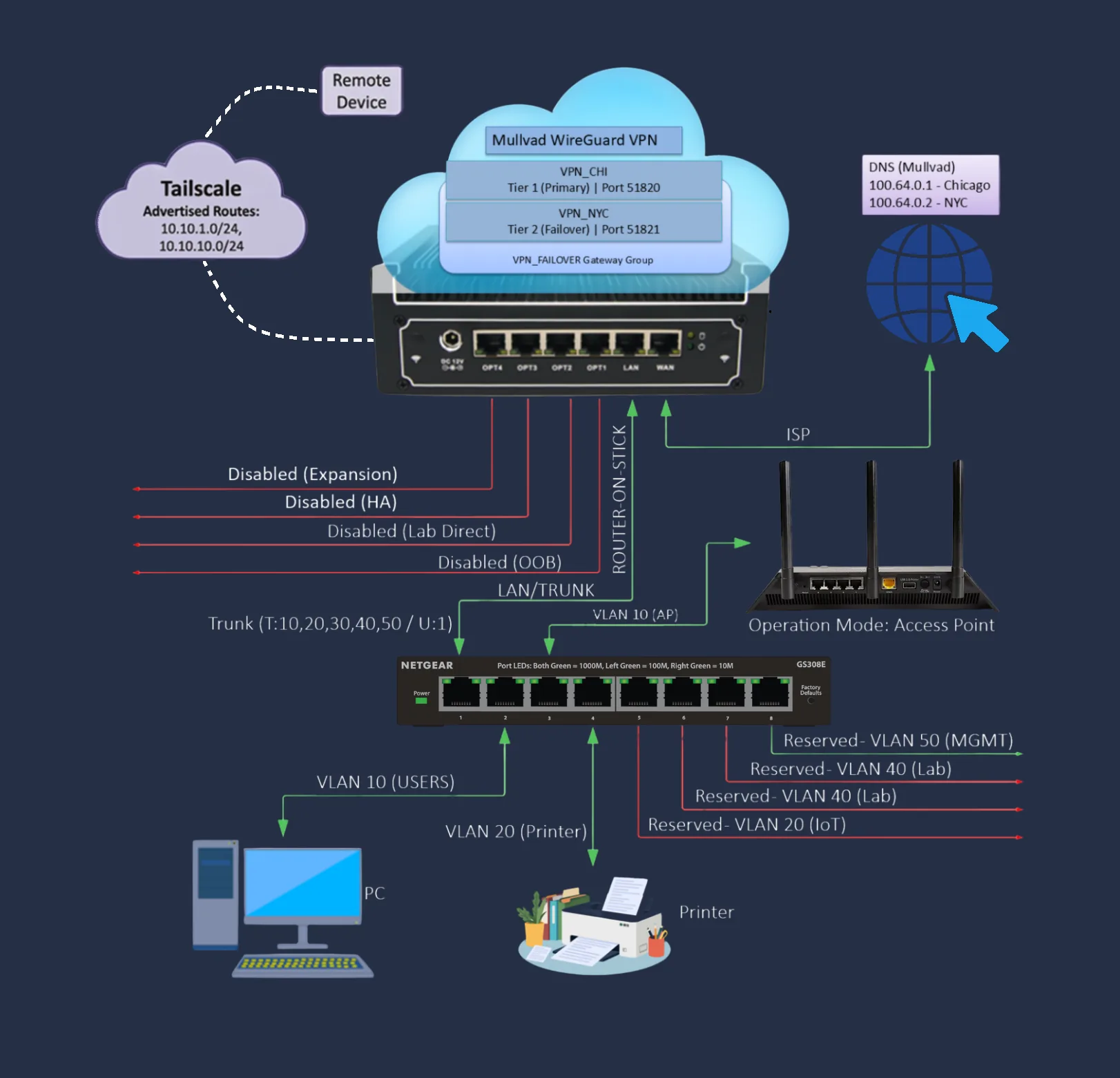
Topology
A "router-on-a-stick" design: one firewall, one switch, all networks ride a single tagged link.
Hardware
| Component | Role | Cost (approx) |
|---|---|---|
| Protectli FW6E (Intel i7, 16 GB RAM) | Firewall / router running pfSense 2.8.1 | ~$700 |
| Netgear GS308E v4 | Managed switch, 802.1Q VLAN trunking | ~$30 |
| UniFi U7 Lite (managed by UniFi controller) | Wi-Fi access point, VLAN-aware per SSID | ~$100 |
| Cisco Catalyst 3560 + Cisco 1900 | CCNA practice lab gear, isolated on its own VLAN | ~$150 |
| Apple Mac Mini M4 | 24/7 application host running Docker (also hosts UniFi controller) | ~$800 |
| Miscellaneous (rack, cables, mounts, subscriptions, etc.) | Physical mounting, wiring, ongoing services (VPN, domain, etc.) | ~$180 |
| Total | ~$1,960 |
Software stack
| Layer | Tool | Role |
|---|---|---|
| Firewall / router | pfSense 2.8.1 | Routing, NAT, firewall, VPN client, DNS |
| Intrusion detection | Suricata | Signature-based network IDS |
| Ad / tracker block | pfBlockerNG | DNS-level blocklists |
| VPN | Mullvad WireGuard (dual tunnel) | Encrypted egress |
| Overlay | Tailscale | Remote-from-anywhere access |
| Container host | Docker on macOS | Self-hosted services (UniFi controller, future Vaultwarden, NAS, AI stack) |
3. Privacy architecture (the core)
Threat model
- Adversary 1: the ISP, observing every byte that leaves the house.
- Adversary 2: a misconfigured device or app trying to bypass the VPN.
- Adversary 3: a transient VPN failure that "fails open" and leaks plaintext traffic.
- Out of scope: nation-state actors, supply-chain attacks on the firewall itself, physical theft.
Defense layers
| # | Mechanism | Purpose |
|---|---|---|
| 1 | Dual Mullvad WireGuard tunnels in a pfSense gateway group | Primary + automatic failover encrypted egress |
| 2 | Outbound NAT bound to VPN interfaces only, zero rules to WAN | If both VPNs are down, traffic has nowhere to go |
| 3 | Firewall rule blocking encrypted DNS (DoH/DoT, ports 443/853) | Stops apps from bypassing system DNS |
| 4 | Firewall rule blocking plain DNS on port 53 | No DNS escape route |
| 5 | Block RFC 1918 inter-VLAN traffic | Default-deny segmentation |
| 6 | Block all IPv6 | Prevents v6 tunnel leak vectors |
| 7 | DNS forwarder pinned to Mullvad resolvers via the VPN | DNS travels inside the encrypted tunnel |
Verification
Tested via ipleak.net and mullvad.net/check:
| Test | Result |
|---|---|
| IP address leak | None (only the Mullvad exit IP is visible) |
| DNS leak | None (only Mullvad resolvers seen) |
| WebRTC leak | None |
| Tunnel failover (primary down) | Secondary tunnel promoted automatically, no traffic dropped |
| Both tunnels down (kill switch) | All traffic blocked, no fallback to ISP |
4. Network segmentation
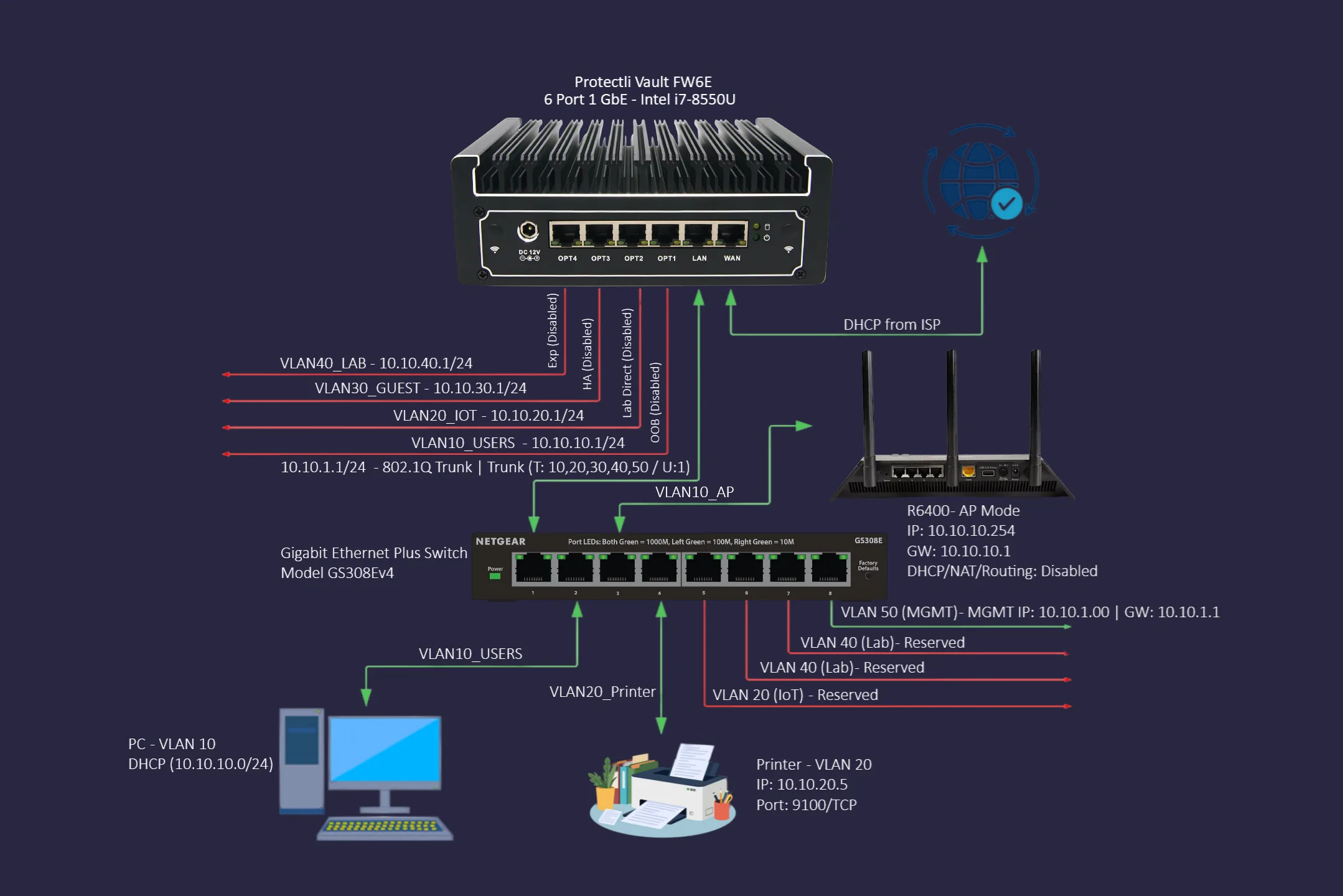
Six VLANs, one job each.
| VLAN | Subnet | Purpose | Internet via VPN? |
|---|---|---|---|
| 1 | 10.10.1.0/24 | Switch + firewall management | Yes |
| 10 | 10.10.10.0/24 | Trusted devices (laptops, phones) | Yes |
| 20 | 10.10.20.0/24 | IoT, printers, smart devices | Yes |
| 30 | 10.10.30.0/24 | Guest Wi-Fi | Yes |
| 40 | 10.10.40.0/24 | CCNA lab gear, isolated from all other VLANs | Yes |
| 50 | 10.10.50.0/24 | Emergency admin, direct WAN, no VPN | No (intentional) |
Inter-VLAN rule: default deny, with a small allow-list for management traffic. VLAN 50 is the only escape hatch, used when something is broken and the VPN itself needs to be diagnosed.
5. What I learned
The point of the project was the learning, not the destination. Most lessons came from breaking things.
Mistakes that taught the most
| Mistake | Lesson |
|---|---|
| Used the same Monitor IP across two VPN gateways | pfSense pins a static route per Monitor IP. Two gateways sharing one IP collide and one falsely shows offline. Each gateway needs a unique target. |
| Trusted a consumer router's "AP mode" | Netgear's AP mode is buggy: the radio toggle drifts, fixed IP resets, guest network is fake VLAN isolation. Enterprise-grade APs solve a real problem. |
| Bought used Wi-Fi hardware to save money | Dead-on-arrival ethernet port, 4 hours of debugging, refund pending. Save money on cables, not on the network's spine. |
| Tried to run Docker on the firewall | pfSense runs FreeBSD, not Linux. Mixing roles also breaks the "firewall does one job" principle. Separate the firewall from application hosting. |
Surprises
- The default gateway is still WAN, not the VPN. Counter-intuitively, this is correct: the encrypted VPN packets themselves need WAN to reach Mullvad's servers. Zero-leak comes from firewall rules, not the default route.
- Mullvad reuses the same DNS IP across servers.
100.64.0.31is anycast: the IP is identical everywhere; the tunnel decides which physical server answers. - VLANs are a router feature, not a switch feature. The switch only tags frames; the firewall enforces who can talk to whom.
6. Limitations
Honest about what does not work yet.
| Limitation | Why | Workaround / plan |
|---|---|---|
| Single firewall = single point of failure | One Protectli box, no high-availability pair. | Acceptable for home. HA would require a second matched device and CARP. |
| No off-site backup of firewall config | Configs live on the device + git repo. | Manual exports to cloud storage; automation planned. |
| Suricata in alert mode only | Tuning out false positives is ongoing. | Will move to block mode after baseline noise is suppressed. |
| Logs are local to pfSense | A reboot or disk corruption loses history. | Centralized syslog server on the Mac Mini is planned. |
| IPv6 fully blocked | Some modern services prefer v6. | Acceptable trade-off; v4 over VPN works universally. |
7. Tooling and documentation
Everything that is not a private key lives in a public git repository. The repo is structured so a stranger could reproduce the lab from scratch. Each commit corresponds to a single, named change. The git log is itself a learning journal.
8. Conclusion
A privacy-first home network is buildable on consumer-grade hardware for about $2,000 all-in, given patience and a willingness to break things. The hard part is not the equipment, it is the discipline:
- Default-deny inter-VLAN traffic, override only when you can justify why.
- Verify every claim with a test (DNS leak check, kill-switch test, failover drill).
- Document the reasoning, not just the settings, so future-you remembers.
- Accept that the project is never "done"; it is a continuously refined practice.
The biggest takeaway: privacy is not a feature you install. It is a property that emerges when every layer of the network is configured to deny by default and prove it.
Appendix: Related reading in the lab repo
- README - project landing page
- firewall-rules.md - per-VLAN firewall chains
- nat-rules.md - the 12 outbound NAT rules that enforce the kill switch
- vpn-failover.md - WireGuard tunnel and gateway group design
- vlan-assignments.md - VLAN map and reasoning
- configs/ccna-lab - CCNA practice lab documentation
- configs/mac-mini - Docker host setup and remote access
Published. Suggestions and corrections welcome via the repo issues.